

How to Navigate the Retirement Planning Journey
 |
The 5 boxes on the navigation bar provide informaiton and resources about each income source when considering retirement planning and then what to do at retirement. |
 |
The Total Retirement Income box outlines how all income sources come together and the written instructions can be used to model different retirement planning scenarios on the Fidelity’s Financial Wellness Dashboard. |
 |
Log in to view personalized retirement planning considerations based on your plan participation. |
Personalized Summary
Log in to view personalized retirement planning information summary which provides valuable benefit insight to help focus your total retirement income modeling experience.
- Know the NGC benefit plans impacting your total retirement income
- Understand the availability of income sources as you model various contribution percentages and retirement dates
- Establish a realistic vision preventing unwanted surprises and delays
It is highly encouraged to begin your planning early with a variety of modeling scenarios. The modeling experience will help you identify a realistic time for your retirement.
Savings Overview
Explore the enhanced modeling capabilities of your Savings Plan benefits within your financial wellness dashboard in NetBenefits to visualize your full potential retirement income. The enhanced modeling capabilities allow you to change contribution percentages and investment strategies to targeted retirement dates. Visualize how your savings plan strategy fits into your total retirement income.
Additional tools and research information are provided in the drop-down selections below. Financial education, online tools and financial workshops can help you make key decisions as you plan and assess your retirement readiness.
|
|
Fast track your modeling success by launching the instructional video in the blue box or by following the written instructions in the Total Retirement Income section drop down for Using the Retirement Analysis Tool. Research the various sources of your total retirement income as you fine tune the modeling. Call the Northrop Grumman Benefits Center at 800-894-4194 should you have questions. |

Get the most out of the Financial Wellness Dashboard —
 |
Watch the tutorial |
|
Model what your savings could look like over time |
Each of the five boxes on the navigation bar above provide relevant information about those sources. The Total Retirement Income box outlines how they all come together and can be used to model different scenarios on the Fidelity retirement planning dashboard.
For detailed information about your Savings Plan benefits, visit the Northrop Grumman Savings Plan page. NetBenefits will be your main source for individual Savings Plan information. Once logged-in, you can find information on the following tabs:
- Summary Tab: Allows you to view your savings balance, contribution amounts and investment returns. You can also access transaction history, view personal statements and review financial terms and definitions.
- Plan Information Tab: Learn more about the details of your plan and access other plan-related documents including a glossary of investment terms and frequently asked questions.
- Other tabs include detailed information on contributions, investments, withdrawals/loans, rollovers, and bank/tax information.
For more information, call the Northrop Grumman Benefits Center at 800-894-4194.
Take advantage of free financial webinars offered through Fidelity. Topics include saving, investing, turning your savings into retirement income, Social Security and more. Some workshops are customized for Northrop Grumman employees/plans and others are more general. Visit the News and Events Center for upcoming events.
In addition, you can register for a complimentary financial one-on-one consultation and a phone-based financial well-being review with a licensed Fidelity representative.
The following retirement planning tools are available on NetBenefits. Access tools to help you create a plan for retirement, ensuring you can get and stay on track.
- Financial Wellness Dashboard: By answering a few questions, you’ll be able to see your estimated retirement income from your savings plan and any other retirement assets. In addition, you’ll identify any potential gaps between what you may need and what you may have in retirement. The retirement analysis tools in NetBenefits, accessed through the Planning Summary page, allows you to explore hypothetical scenarios to potentially improve your retirement planning strategy. You can also get help selecting investments or building your own portfolio in the Savings Plan page.
- Financial Wellness Check-Up: Learn what you’re doing well and ways you can improve your financial well-being.
- Savings and Spending Check-Up: Discover how your savings and spending compare to Fidelity’s 60/30/10 savings rule.
- Power of Small Amounts: Learn how a small change - 1%, 3% or 5% - can make a big difference over the long-term when saving for retirement.
- Contribution Calculator: Learn how saving more now can contribute to extra income at retirement.
- Traditional vs. Roth Retirement Savings Plan Modeler: View hypothetical scenarios showing differences between traditional pre-tax and Roth contributions.
- Take Home Pay Calculator: Learn how your pre-tax contributions may affect your take-home pay.
- Retirement Decision Guide: The tool will ask you questions about yourself and your retirement plans. Based on your answers, you’ll receive a priority path (high, medium, low) to help you navigate your Retirement Decision Guide.
In most situations, you don’t need to move money out of your Northrop Grumman Savings Plan just because you’re retiring. You’ll still have access to the same investment choices you’ve had all along--you just won’t be adding any additional contributions.
- When you reach age 72, you’ll be required to start taking minimum distributions from your account.
- You can request a partial or full distribution of your account at any time by calling the Northrop Grumman Benefits Center at 800-894-4194.
- If your account balance is less than $1,000, your balance will be cashed out 60 days after you leave the company.
Rolling over your money from the Northrop Grumman Savings Plan to an eligible retirement plan, such as another qualified plan or an IRA, is another option. This will allow you to defer federal and state income taxes and avoid any applicable penalties.
Before rolling over your money, you should compare the underlying fees and expenses of the investment options in the Savings Plan to those in the receiving account.
The Savings Plan also allows you to roll over your balance to purchase an annuity.
If you’d like to roll over some or all of your Savings Plan balance or ask about the annuity option, call the Northrop Grumman Benefits Center at 800-894-4194.
A withdrawal gives you access to the money in your account, but is subject to federal and state income taxes. If you’re under age 59½, a withdrawal may potentially have an early-withdrawal penalty, unless you qualify for an exception to this rule.
- A partial withdrawal allows you to withdraw up to a specified dollar amount.
- A full distribution closes out your account. You can choose what to do with the assets—i.e., how much to withdraw as cash and how much to roll over to another qualified plan.
Make sure you understand the tax impact of taking your money from the Northrop Grumman Savings Plan. Read the “Taxes and Your Savings Plan Benefits” section of the Summary Plan Description (SPD) available on NetBenefits. You should also consult your tax or financial advisor.
If your account balance is $1,000 or less, it will be automatically distributed to you as a lump sum payment 60 days after you separate from the company unless you choose to request a full payment (rolled over or as cash) prior to that date.
If you have an outstanding loan from the Savings Plan when you leave Northrop Grumman, you may choose to make monthly loan repayments via direct debit from your checking or savings account.
To avoid taxation on your outstanding loan balance, you must make timely loan repayments and leave some or all of your balance in the Northrop Grumman Savings Plan. You’ll receive instructions on how to establish loan repayments via direct debit from the Northrop Grumman Benefits Center.
When it comes to getting personalized support and advice on your financial well-being, we’ve got you covered with convenient options, tailored to your needs:
- Complimentary financial one-on-one consultations are available and offer a phone-based financial well-being review with a licensed Fidelity representative. Register here.
- Make an online appointment with a Fidelity advisor or attend a retirement planning session at a local Fidelity Investment Center.
- Access a team of professionals who can help you create and maintain a retirement plan with the Fidelity Personalized Planning & Advice Please note there’s an advisory fee for this service.
Additional Resources
Financial Wellness Dashboard
Your centralized hub, designed to provide financial insights and enhanced planning tool capabilities to help you make informed decisions with confidence.
Schedule an Appointment
Set up time to meet 1-1 with a retirement planner.
Learning Resources
Research related topics through interactive tools, articles, videos and workshops.
Retirement Decision Guide
Get help in your one-of-a-kind retirement journey.
Pension Overview
Explore the enhanced modeling capabilities within your financial wellness dashboard and visualize your full retirement net income. Access the planning tool, found under Manage Your Plan, on the NetBenefits homepage. The enhanced modeling capabilities include savings contributions, savings account balances, and pension payment dates (if applicable).
A pension can be an important source of retirement income. Employees hired on or after July 1, 2008 are generally not eligible to participate in the Northrop Grumman Pension Program but pension benefits earned from a prior company can be included in your pension analysis.
Additional pension research information is provided in the drop-down selections below. This information may help refine your modeling experience and further research pension options available to you. Also shown below are multiple sources of support.
Take Action
|
|
Fast track your modeling success by launching the instructional video in the blue box or by following the written instructions in the Total Retirement Income section drop down for Using the Retirement Analysis Tool. Research the various sources of your total retirement income as you fine tune the modeling. Call the Northrop Grumman Benefits Center at 800-894-4194 should you have questions. |

Get the most out of the Financial Wellness Dashboard —
|
Model your retirement income with or without pension(s) |
Each of the five boxes on the navigation bar above provide relevant information about those sources. The Total Retirement Income box outlines how they all come together and can be used to model different scenarios on the Fidelity retirement planning dashboard.
Your age at retirement has an impact on the value of your pension benefit. Consider the following age milestones as you estimate your pension benefits.

Deciding to retire before your normal retirement age may result in a reduced benefit because the benefit will be paid to you over a longer time period.
Complete your total retirement picture by including pension estimates at various ages in the decision process. Make the most of the Retirement Analysis Tool in NetBenefits by including pension income in the analysis.
Another key decision at retirement is deciding how to receive your pension benefit or what optional form of payment works best for you. Generally, you can receive your pension benefit as a monthly “single life annuity” amount payable to you for your lifetime only, or as a “joint & survivor annuity” amount payable to you and after your death, to your beneficiary.
The following table shows some sample pension payment amounts for common optional forms of payment.

Follow these steps to add your pension income to the Retirement Analysis tool accessed through Planning Summary:
- Gather the pension estimates you performed during your retirement planning.
- Navigate to Financial Wellness Dashboard on NetBenefits.
- Create or review your Retirement Goal.
- Complete the Retirement Income Section; This will break out your income sources for Social Security, Pensions and Annuities.
- Enter manually any pension income earned at prior employer (if applicable). Call your prior employer to request the pension estimate and enter the results.
- For Fidelity-recordkept pensions, you will be able to leverage the Pension Modeler tool within the pension category of the Retirement Income section. Changes to modeled projections are for scenario planning only and do not make any formal changes to pension elections.
For more information, review the “Use the Retirement Analysis Tool” in the Total Retirement Income section. If you have questions or want help reviewing your results, call a Workplace Planning consultant at 800-420-2363.
Pension estimates can be very detailed and complicated. Plan to start gathering your pension information well in advance of your actual retirement date. Here are a few pointers as you review your estimates:
- It’s important to model your pension benefits at least a year prior to beginning your pension payments. Completing the pension estimates in advance also helps prevent retirement delays in case you need to locate any required participant information.
- Understand all available optional forms shown on your estimates to help you decide how you want to receive your payment.
- Note that reductions usually apply to convert your accrued pension to optional forms of payment that cover joint and survivor scenarios or have certain death benefit features.
- Confirm the information for your designated beneficiary(ies).
- If you are within 90 days of retirement, you can request access to a personal Retirement Benefits Coordinator (RBC) through the Northrop Grumman Benefits Center. This can help reduce any surprises.
- Understand your potential longevity needs, including providing benefits to your loved ones. The Retirement Analysis tool can show you an estimate of joint and survivor scenarios.
- Test your retirement plans with sensitivity analysis from the Retirement Analysis tool to help ensure you’re fully prepared to meet your essential needs. Establish a plan for unexpected emergencies, cost of living increases or high inflation periods.
- Designate your beneficiaries for your retirement benefits in the election forms.
Additional Resources
Financial Wellness Dashboard
Your centralized hub, designed to provide financial insights and enhanced planning tool capabilities to help you make informed decisions with confidence.
Learning Resources
Research related topics through interactive tools, articles, videos and/or workshops.
Schedule an Appointment
Set up time to meet 1:1 with a retirement planner.
Retirement Decision Guide
Get help in your one-of-a-kind retirement journey, beyond your financial well-being.
Social Security Overview
Explore the enhanced modeling capabilities of your Social Security benefits within your financial wellness dashboard to visualize how your Social Security benefits may fit best within your retirement income. Social Security can be a key component of your total retirement income. Utilize the planning tool through NetBenefits to explore how a variety of eligible retirement ages impact your retirement income.
|
|
Fast track your modeling success by launching the instructional video in the blue box or by following the written instructions in the Total Retirement Income section drop down for Using the Retirement Analysis Tool. Research the various sources of your total retirement income as you fine tune the modeling. Call the Northrop Grumman Benefits Center at 800-894-4194 should you have questions. |
Get the most out of the Financial Wellness Dashboard —
|
Watch the tutorial |
|
Model what your savings could look like over time |
Each of the five boxes on the navigation bar above provide relevant information about those sources. The Total Retirement Income box outlines how they all come together and can be used to model different scenarios on the Fidelity retirement planning dashboard.
Your full retirement age under Social Security varies based on the year you were born and can be between ages 65 and 67. You may begin payments as early as age 62, but reductions apply for beginning payments prior to your full retirement age.
By contrast, you must begin payments by age 70. Benefits will increase if you begin payments after your full retirement age. While many people could benefit from waiting until age 70, others may need this source of guaranteed income sooner to help pay for expenses. See the example below for more detail.

Colleen is age 62. If she waits until age 67 (her full retirement age) to collect, she will receive approximately $2,000 per month. However, if she begins taking benefits at age 62, she’ll receive only $1,400 dollars per month. This “early retirement” penalty is permanent and results in her receiving 30% less. If she waits until age 70, her monthly benefits will increase another 24% over what she would receive at age 67, to a total of $2,480 per month.
The Retirement Analysis tool, accessed through Financial Wellness Dashboard on NetBenefits, allows you to estimate Social Security benefits payable at various ages. The estimates are based on your current pay and the age you wish to begin payments.
For estimates based on your complete work history and to find valuable information about eligibility, full retirement ages and special payment arrangements visit the Social Security website.
Visit the NetBenefits Learn Hub to view available workshops, where you can learn valuable information and speak to a subject matter expert.
The following list provides additional Social Security planning information you may find helpful.
Start by creating (or signing in) to your personal “my Social Security account” on the Social Security website to verify your information. Benefits are based on the earnings in the Social Security system. Other items you may want to gather include:
- Your Social Security number.
- Your date of birth. You may need an original birth certificate or other proof of age.
- Your employer names or self-employment records for the past two years. You may need a copy of your W-2 for the prior year.
- Your bank information to set up direct deposit.
- Names of your family members who may be eligible to receive future benefits.
Applying online may be an easy option to complete your application at your own pace. However, you can also apply by phone or at a Social Security office.
If applying by phone call 1-800-772-1213, gather the information summarized in “Where to Start” above. A representative will take you through the process step by step.
If applying in person, check the Social Security website to find a local office, and confirm what you need to bring when you schedule an appointment.
Note that it takes up to three months to complete the payment application process and begin your Social Security payments.
Additional Resources
Financial Wellness Dashboard
Your centralized hub, designed to provide financial insights and enhanced planning tool capabilities to help you make informed decisions with confidence.
Learning Resources
Research topics of interest through interactive tools, articles, videos, or workshops.
Schedule an Appointment
Set up time to meet 1:1 with a retirement planner.
Retirement Decision Guide
NetBenefits is the place to go for learning, planning and collecting your savings benefit.
Personal Income
Explore the enhanced modeling capabilities of other personal income sources within your financial wellness dashboard to visualize how your personal income enhances your retirement income. Decisions on how and when to receive income from other personal sources may impact your planning. Financial education, expert advice, along with enhanced modeling capabilities can help you plan your retirement income.
All the personal information entered will remain private and only visible to you. Additional research information is provided in the drop-down selections below.
|
|
Fast track your modeling success by launching the instructional video in the blue box or by following the written instructions in the Total Retirement Income section drop down for Using the Retirement Analysis Tool. Research the various sources of your total retirement income as you fine tune the modeling. Call the Northrop Grumman Benefits Center at 800-894-4194 should you have questions. |
Get the most out of the Financial Wellness Dashboard —
|
Watch the tutorial |
|
Model different retirement scenarios based on your personal income sources |
Each of the five boxes on the navigation bar above provide relevant information about those sources. The Total Retirement Income box outlines how they all come together and can be used to model different scenarios on the Fidelity retirement planning dashboard.
Below are examples of other resources you can explore. This isn’t an exhaustive list, but it’s a good place to start your research.
- Personal Savings and Investments – savings accounts, brokerage accounts and other assets can supplement your retirement income.
- Health Savings Accounts (HSAs).
- Traditional or Roth Individual Retirement Accounts (IRAs).
- Other Retirement Plans – don’t forget to include prior employer retirement plans.
- Real Estate or Personal Property – downsizing or selling your home can offer a source of income during retirement.
- Company Nonqualified Retirement Plans – certain employees participate in supplemental retirement plans that provide benefits beyond IRS limits.
- Continued Employment – many employees plan to keep working during retirement to offset medical costs or supplement income.
Once you've identified the other resources you want to include in your retirement income, you can incorporate them into your overall plan. The retirement planning tools available on NetBenefits help you not only create a plan for retirement, but also offer guidance on how to include other sources in that plan. By answering just a few questions, you’ll be able to view your estimated retirement income from all your assets.
Visit the Financial Wellness Dashboard on NetBenefits for more details.
For personalized guidance, visit NetBenefits to register for a complimentary financial one-on-one consultation or schedule a phone-based financial well-being review with a licensed Fidelity representative. During the conversation, you can discuss how to include other resources in your retirement plan.
In addition, you can attend a retirement planning session at a local Fidelity Investment Center or make an online appintment with a Fidelity advisor.
Begin gathering information from your other sources at least one year prior to your retirement. The sources may be payable differently and it may take time to set up the various payments. Knowing this information early may help prevent unwanted confusion and delays when your retirement date arrives.
Once you’ve identified your other sources, enter your information into the Financial Wellness Dashboard or call the Northrop Grumman Benefits Center (NGBC) at 800-894-4194 to:
- Speak with a representative.
- Start a conversation with a planning and guidance counselor who can discuss how your other sources may fit into your overall retirement plan.
In addition, you can schedule a 1:1 session with a retirement planner or attend a retirement planning session at a local Fidelity Investment Center.
Additional Resources
Financial Wellness Dashboard
Your centralized hub, designed to provide financial insights and enhanced planning tool capabilities to help you make informed decisions with confidence.
Learning Resources
Research other resource topics through interactive tools, articles, videos or workshops.
Schedule an Appointment
Set up time to meet 1:1 with a retirement planner.
Retirement Decision Guide
Get help in your one-of-a-kind retirement journey, beyond your financial well-being.
Retiree Medical Overview
Choosing the right health coverage for yourself and your dependents is an important decision for your retirement. Review your options, including what may be available through Northrop Grumman and how that aligns with your or your family’s healthcare needs and also decide what type of health care coverage you prefer.
The information below will help you consider what’s available to you at retirement and determine your eligibility for retiree medical coverage through Northrop Grumman. Review tips and resources to understand how the application process works.
|
|
Fast track your modeling success by launching the instructional video in the blue box or by following the written instructions in the Total Retirement Income section drop down for Using the Retirement Analysis Tool. Research the various sources of your total retirement income as you fine tune the modeling. Call the Northrop Grumman Benefits Center at 800-894-4194 should you have questions. |
Get the most out of the Financial Wellness Dashboard —
|
Watch the tutorial |
|
Model health coverage options based on your family's needs |
Each of the five boxes on the navigation bar above provide relevant information about those sources. The Total Retirement Income box outlines how they all come together and can be used to model different scenarios on the Fidelity retirement planning dashboard.
-
Your Northrop Grumman Health Plan: The health plan coverage you have as an active employee ends at the end of the month in which you retire. At that point, Northrop Grumman will give you the option to continue your medical, dental, vision and/or EAP coverage through COBRA for 18 months.
-
Your Eligibility for Retiree Medical Coverage: For more information, view the “Understanding Your Options At Retirement” for more information.
-
Cost of Coverage: Continuing your coverage through COBRA or enrolling in your spouse’s coverage may be less costly than retiree medical coverage. You can enroll in a Pre-Medicare or Medicare health plan through Via Benefits at a later date.
-
Medicare Penalty: You become eligible at age 65, or earlier if you have certain health conditions or are disabled. It’s important to sign up for Medicare as soon as you’re eligible. If you don’t, you may need to pay higher premiums.
-
Your Health Savings Account (HSA): You take your HSA with you when you retire. Save as much as you can tax-free while you're eligible so you have funds available for your healthcare expenses when you retire.
-
Healthcare Expenses Can Be Significant in Retirement: Factor in your anticipated healthcare costs in the retirement plan you’re building through the Retirement Analysis tool in NetBenefits accessed through the Financial Wellness Dashboard. Fidelity’s Prepare for the Reality of Healthcare in Retirement workshop can also help you plan. Look for an upcoming workshop on NetBenefits.
Before you retire, call the Northrop Grumman Benefits Center (NGBC) at 800-894-4194 to learn what’s available to you. Be sure to request a retiree medical modeling statement that can describe your options.
When you retire from Northrop Grumman, you may:
-
Continue your medical, dental, vision and/or EAP coverage for yourself and any covered dependents you have as an active employee under COBRA for 18 months.
-
Enroll in one of the health plans available through Via Benefits if you’re under age 65 and eligible. You can purchase individual Pre-Medicare supplemental coverage through Via Benefits, a private insurance exchange that provides eligible retirees access to supplemental insurance plans.
-
Enroll in Medicare Parts A and B if you're 65 or older; Medicare will be your primary health insurance at that point. You can purchase individual Medicare supplemental coverage through Via Benefits, a private insurance exchange that provides eligible retirees access to supplemental insurance plans. Note that if you're under age 65 and your spouse is over age 65, or vice versa, the person under 65 may enroll in a Pre-Medicare health plan and the person over 65 may elect to enroll in Medicare supplemental coverage, both through Via Benefits.
-
Choose a mix of the above options – for example, enroll in a Via Benefits Pre-Medicare health plan (if under age 65) while continuing your active dental coverage through COBRA.
-
Defer retiree medical coverage until a later date.
For more information, view the Northrop Grumman Retiree Medical Plan Summary Plan Description.
Northrop Grumman is the integration of over 20 companies across aerospace, technology and defense industries. Your company heritage and employment history may impact your eligibility for a subsidy under the Northrop Grumman Retiree Medical Plan and what you pay for coverage.
In general, you're eligible for retiree medical coverage if, at the time you retire from Northrop Grumman:
- You're age 55 or older with a minimum of 10 years of service, or
- Age 65 or older with a minimum of five years of service.
You and Northrop Grumman will either share the cost for coverage or you’ll be required to pay the full cost, depending on your company heritage and employment history. Note that most employees hired after 2003 aren’t eligible for subsidized coverage.
To determine your eligibility, call the Northrop Grumman Benefits Center (NGBC) at 800-894-4194 and request a retiree medical modeling statement, which will show your options.
If you have more than one retiree heritage classification, make sure to compare the subsidies offered under each heritage (for both pre-65 and 65 or older) and choose which works best for you.
You’ll be starting a NEW plan as a retiree. Amounts applied to the deductible and out-of-pocket maximum for your active coverage don’t carry over to your new retiree coverage. All out-of-pocket amounts are reset at the beginning of each plan year, on Jan. 1.
If you’re under age 65 and eligible for Medicare due to a disability, our medical plans coordinate with Medicare, so make sure you’re enrolled in both Medicare Parts A and B.
For more information, view the Health Care in Retirement and Northrop Grumman Retiree Medical Plan Summary Plan Description.
If you're age 65 or older, Medicare will be your primary medical insurance. Access the Medicare website to learn more about Medicare and how to enroll.
You have the option to purchase additional coverage to supplement Medicare, and Northrop Grumman partners with Via Benefits, a private insurance exchange, to give you access to a broad range of supplement insurance plans and help in selecting and enrolling in supplemental coverage.
Depending on your company heritage and employment history, you may be eligible for a Retiree Health Reimbursement Account (RHRA) with Via Benefits. You receive a fixed annual “credit” amount in your RHRA that you can use to help pay for your purchase of an individual supplemental plan, prescription drug, dental, vision, TRICARE supplemental or long-term care coverage, or Medicare Part B premiums.
You must elect a supplemental medical or prescription drug plan through Via Benefits to use the RHRA. (Exception: you may enroll in TRICARE supplemental or long-term care coverage and notify Via Benefits of your enrollment).
For more information and to enroll, visit the Via Benefits website or call 855-832-0976.
Certain retirees in a few heritage classifications may stay enrolled in a Northrop Grumman Retiree Medical Plan option when they reach age 65 instead of receiving an RHRA through Via Benefits, and some may receive a stipend through the Medicare Part B Reimbursement and Stipend Program that’s different from an RHRA. Your retirement modeling statement will indicate if you're eligible for these options.
When you’re ready to retire, a Retirement Benefits Coordinator can assist you throughout the retirement process. A specially trained Northrop Grumman Benefits Center representative can answer questions about your retirement benefits and provide personalized support. To get started, call the NGBC at 800-894-4194 and request a personal Retirement Benefits Coordinator (RBC) within 90 days period of commencing your benefit.
If You’re Under Age 65
Make sure you understand the different coverage effective dates as you plan for retirement.
- Retiree medical coverage will be effective the first of the month following your enrollment.
- If you retire from Northrop Grumman, the benefits you have as an active employee remain in effect until the end of the month in which you retire. If you terminate your employment, your benefits end on the day of your termination.
- Any amounts applied to your deductible and out-of-pocket maximum from active coverage or COBRA reset to $0 when you enroll in retiree medical coverage.
Contact the Northrop Grumman Benefits Center (NGBC) at 800-894-4194 to determine if you’re eligible for the Retiree Health Reimbursement Arrangement (RHRA) or other subsidized retiree medical coverage. Then, visit the Via Benefits website or call 844-876-6367 to learn about the supplemental PreMedicare options they offer, and to enroll.
If You’re Age 65 or Older
Medicare will be your primary health insurance coverage if you’re age 65 or older, and you have the option to purchase additional coverage to supplement Medicare. Visit the Medicare website to learn how to enroll. It’s important to sign up for Medicare as soon as you’re eligible. If you don’t, you may be charged higher premiums.
Contact the Northrop Grumman Benefits Center (NGBC) at 800-894-4194 to determine if you’re eligible for the Retiree Health Reimbursement Arrangement (RHRA) or other subsidized retiree medical coverage. Then, visit the Via Benefits website or call 855-832-0976 to learn about the supplemental Medicare options they offer, and to enroll.
Split Coverage Situations
In some cases, the retiree may be age 65 or older when the spouse is still under age 65, or vice versa. In these situations:
- The individual under age 65 may enroll in Pre-Medicare medical coverage under Via Benefits until they reach age 65.
- The individual who is age 65 or older may have access to the Medicare services offered through Via Benefits.
COBRA Benefits
When you retire from Northrop Grumman, you and your covered dependents may be able to continue your medical, dental, vision and/or EAP coverage for a limited time through COBRA. When COBRA ends, you may enroll in Via Benefits retiree medical coverage.
Contact the Northrop Grumman Benefits Center (NGBC) at 800-894-4194 and ask for the cost of COBRA coverage to help you compare your choices. COBRA is a continuation of your active coverage, so any amounts applied to your deductible and out-of-pocket maximum for the current year do not reset to zero.
Additional Resources
Financial Wellness Dashboard
Your centralized hub, designed to provide financial insights and enhanced planning tool capabilities to help you make informed decisions with confidence.
Learning Resources
Research other resource topics through interactive tools, articles, videos or workshops.
Schedule an Appointment
Set up time to meet 1:1 with a retirement planner.
Retirement Decision Guide
Get help in your one-of-a-kind retirement journey, beyond your financial well-being.
Total Retirement Income Overview
Now that you’ve explored information about Savings, Pension, Social Security, Personal Income and Retiree Medical, the next step is to put the pieces together and compare your estimated expenses to complete your total retirement income picture. The information in this section can help with planning: Review ways to maximize your retirement income, minimize expenses and plan ahead for essential expenses throughout your retirement. On Fidelity NetBenefits access the planning tool found on your financial wellness dashboard. The modeling tool pulls in your Northrop Grumman benefit plan information such as savings contributions, savings account balance and pension information (if applicable). Model your potential retirement income vs. expected expenses and explore various timeframes to initiate payments.
Total Retirement Income Diagram

|
|
Fast track your modeling success by launching the instructional video in the blue box or by following the written instructions in the Total Retirement Income section drop down for Using the Retirement Analysis Tool. Research the various sources of your total retirement income as you fine tune the modeling. Call the Northrop Grumman Benefits Center at 800-894-4194 should you have questions. |
Watch to explore the Financial Wellness Dashboard —
Each of the five boxes on the navigation bar above provide relevant information about those sources. The Total Retirement Income box outlines how they all come together and can be used to model different scenarios on the Fidelity retirement planning dashboard.
Maximize your Retirement Income by identifying the available sources to include in your plan. Identifying them now and estimating how they might change over time can help give you the most accurate picture when you reach retirement age.
- Savings: Review the savings information in the Savings section or log on to savings balance, contribution amounts and investment. Consider including an HSA in your retirement strategy since its tax advantages and potential for long-term savings can effectively supplement your other retirement accounts.
- Pension: The information in the Pension section can help you make an informed decision on your pension. You can estimate and compare different payment amounts and schedules that may be available to you if you are eligible for a pension benefit.
- Social Security: Make sure you understand the basics of Social Security by reviewing the Social Security section (click button above). Learn about eligibility and retirement ages to maximize your benefits.
- Personal Income: Identify other income sources by reviewing the Personal Income section.
Your total retirement income represents one side of the equation, but it must be offset by your expected expenses during retirement. Your expenses may vary once you reach retirement; for example, spending on food, entertainment and transportation may remain stable, but spending on housing may decrease and spending on health care may increase.
A general rule of thumb is to expect expenses between 55-80% of your pre-retirement income. There are a number of retirement expense calculators in the Retirement Analysis tool in NetBenefits, accessed through the Financial Wellness Dashboard. For more details, view the section below.
Another major expense during retirement is medical cost. For information about choosing the right health coverage for you and your dependents, view the Retiree Medical section. Understanding your options, including what may be available through Via Benefits, can help you decide on the right plan for the right price.
Another way to analyze how to maximize income and minimize expenses is to model various scenarios and outcomes. Financial Wellness Dashboard on NetBenefits is a great resource for retirement planning. This section provides access to information and powerful tools that allow you to model your total retirement income.
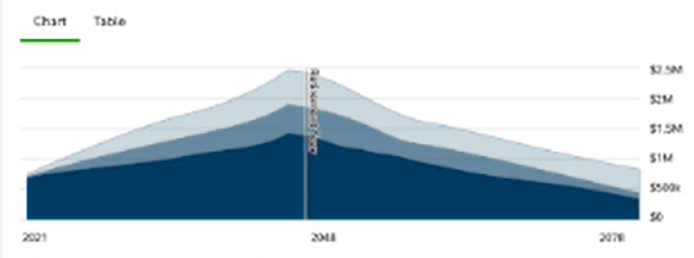
The personalized dashboard incorporates relevant planning tools, resources and integrated benefits to provide a holistic view of a participant’s retirement plan. By answering just a few questions, you’ll be able to see your estimated retirement income from the Savings Plan and any other retirement assets and identify a potential gap between what you may need and what you may have in retirement. The Analysis page will provide projection data with easy to navigate charts and tables to identify any potential shortfalls. The Strategies section will provide additional optimization calculators and opportunities to plan with different risk factors (i.e., asset allocation)
After you engage with the tool, you’ll receive a plan success measure. Review the results chart for potential gaps and valuable suggestions to close it. Once you have a plan in place, the investment strategy tool makes it easy to implement your plan with different investments whether you are an investor who prefers to do it on your own or with help.
Where to start - Log in to NetBenefits. In the upper right-hand corner of the home page/screen, you will see "Set goals, track your progress, and take control". Click on "View your dashboard", then "Go to Your Retirement Goals" to see your analysis.
Play with the numbers - You can edit your assumptions by scrolling to your profile section and click on edit where you willl see accounts on the left side of the screen. Go to the edit button next to the NGSP. One of the assumptions you can change is the percentage of pay that you contribute to each pay period. After you adjust the contribution rate, you'll see how it affects your projected account balance at retirement.
See the big picture - The dashboard shows a simple visual of how your savings, any employer match, and other sources (like Social Security) combine to form your total retirement income.
Additional Resources
Financial Wellness Dashboard
Your centralized hub, designed to provide financial insights and enhanced planning tool capabilities to help you make informed decisions with confidence.
Learning Resources
Research topics of interest through interactive tools, articles, videos, or workshops.
Schedule an Appointment
Set up time to meet 1:1 with a retirement planner.
Retirement Decision Guide
Get help in your one-of-a-kind retirement journey, beyond your financial well-being.